|
| |
Salary Survey Downloads
(Click here for Download Instructions)
(Each of the Free Downloads should take less than two minutes to complete)
(If you want a findpay program for another of our compensation surveys,
please contact us.)

findpay allows quick analysis based on all the data from a given compensation
survey. In addition to the information from the reports, the findpay
program will allow you to produce results unavailable in the reports.
After you have downloaded one of the setup.exe files above, you
execute it to install findpay, and can use the free, unregistered version for
that survey, and/or any additional surveys you download.
- The unregistered
versions of findpay are limited to a single variable and value at a time, and
only the Median Total Compensation is reported. Also, a window will appear
before each calculation completes to remind that you are using the unregistered
version.
- If you purchase the registered version, you will be able to do analyses with
more than one variable and value at once, see all the resulting pay rates
(including the pay rates above that are red
in the unregistered version), and eliminate the reminder window.
The findpay program requires Windows 95/98/ME/NT/2000/XP or later.
Download Instructions
- Click on the findpay program link at the top of this page for the
survey you want. You should see a dialog box similar to the following.

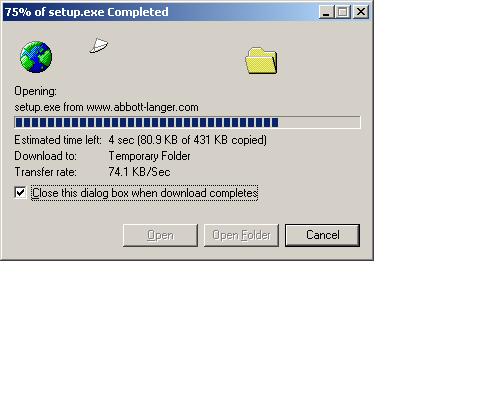
- Click on Run this program from its current location. You
should see two dialog boxes similar to the following. (You could Save
this program to disk, but that would be a little more complicated.
You would have to select a folder for saving the installation program, go to
that folder with Windows Explorer, and execute the program in that folder )
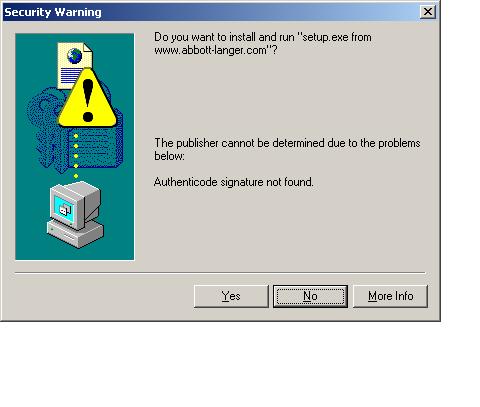
- Click on Yes. You should see a dialog box similar to the
following.

- Follow the directions on screen to complete the installation. You
can install one or more of the findpay programs for different salary surveys
by repeating these instructions.
Go back to TOP of
page.
|


 CLICK
HERE
CLICK
HERE